Friday, September 21, 2018


Wednesday, September 14, 2016

Wondering What to Write in Your Writer's Notebook?

Here are five possibilities:
  1. Find an object that's important to you. Describe every detail of it. Tell the story of how it came to be important to you.
  2. Take a line for a walk; find a book that you like and copy down a line from the book (make sure to say where it came from!). Use that line to make up your own story or poem.
  3. Draw a doodle of an island. Name the features. Tell an adventure story about the island.
  4. Go outside. Sit quietly for five minutes. Describe every sound that you just heard.
  5. Tell a family story. Think about the stories that your family likes to tell over and over. Choose one and write it down (remember to only tell stories that are yours to tell. A particularly embarrassing story about a sibling is probably not the best choice).
And if those don't work, try going to this First Line website and see if it's useful for you.

Monday, September 12, 2016

Useful Questions to Ask Kids About Books


  1. If you were to make a movie about the book, what would you change? Who would you cast in the book?
  2. What if happened differently?
  3. If you met in school, would you want to be friends? Why?
  4. Why do you think made that choice?
  5. What do you think is going to happen next. Why?
  6. That event in the book reminds me of when happened to you. 
  7. What if and met? What would happen?
  8. What made you choose this book?
  9. If you could change something in the book, what would it be?
  10. What choices by
    made sense? Which ones didn't?

Sunday, September 11, 2016

Writing Memory

The good:
When I was in second grade, a dear friend and I wrote a song together. My teacher, who played the guitar, helped us put the words to music. The song was called, "Let's Go See a Beaver Dam." We taught the song to the other students in the class, and then we all sang it together while another teacher recorded us. Then, MY SONG was played on the radio. I remember how much fun it was to come up with the lyrics and how special my friend and I felt when we got to stay inside during recess for a composing session. When I heard my song on the radio, I felt like a real writer. I was so proud. I'm positive that my feelings about that moment fueled my in-school writing for ages.

The bad:
In sixth grade, there was a girl who was incredibly mean. She had been picking on me for ages, and I decided that I would get back at her. My weapon? A note. I started writing it in science class, and I remember that I poured all the feelings I had into that note: anger, bewilderment, powerlessness, sadness. Then my teacher saw me writing. He took the note. He didn't say anything about it. He just kept teaching, but he had MY NOTE in his hand. At the end of class, I ran out of the room and headed back to my homeroom teacher's classroom. It wasn't over, though. At the end of the day, my homeroom teacher pulled me aside. My science teacher had shared the note with her. My homeroom teacher spent fifteen minutes telling me how horrible of a person I am and how in all her days of teaching, she had never seen such an unkind piece of writing. I didn't even bother to tell her about the bullying. I just let her yell at me and went to catch my bus home. I didn't cry until I got on the bus.

(Note: these two paragraphs are writing memories for my students to use as examples for their English homework. I chose one happy memory and one not happy memory. Why? Brandt did an amazing study where she asked people to tell her their earliest reading memories and their earliest writing memories. Overwhelmingly, people's earliest reading memories were positive. People's earliest writing memories? Not so much. When students mine their feelings about writing, it helps them think about why they might have developed preconceived notions about whether or not they are good writers)

Friday, July 22, 2016

The Writing Blerch - in Honor of the Oatmeal's Running Blerch

Click on the image to visit the Oatmeal's cartoon about running.
I started running long distances when I turned 30, and I love, love, love the Oatmeal's comic about the blerch. I'm actually wearing my Blerch tech-shirt right now because I try to go on a run in the morning before I start dissertating to counteract all the sitting I do while I'm working.

I tend to write the same way I train - I set up specific amounts of time for work, and I try to make mini-goals. For running right now, I'm doing a couch to 5k training program because apparently, after you have a baby, jumping right into training for a half is frowned upon by your midwife. Also because I need to in order to get back in shape. But it feels better to blame it on someone else.

For writing right now, my goal is to write two pages a day. Today's other goal is to get 2 more descriptive review transcriptions done.

Every day, I assume that, because I wrote two pages the day before, psyching myself up for today's two pages will be easy.

It's not.

Every day, I think, "Oh, I'll just skip my two pages today," and then I have to force myself to start writing. Right now, I'm putting off the two pages by writing a blog post.

I don't get it. I like the part where I'm actually writing, so why is it always so hard to get started?

The answer is clearly that there is a special Blerch for writers.

I will now tell the Blerch to shove off, and I will actually write my two pages.

So there, Blerch.

Wednesday, July 6, 2016

Writing = Complicated

This is me bouncing my new daughter Ella (7 weeks. Awesome baby) on my knee while I review transcripts because writing = complicated. She woke up early from her nap, and if this dissertation is ever going to get written, sometimes she has to help by snuggling while I write 1-handed.

As a recipient of a grant from the Agnes & Sophie Dallas Irwin Foundation, I wanted to document my summer writing, partly to ground myself as I try to keep working through moments like this, and partly as a way to say thank you to the Agnes & Sophie Dallas Irwin Foundation. 

When I wrote the application for the grant, I said, "When Virginia Woolf said that a woman needs a room of one’s own to write, I wonder if she ever thought about the impact of a five-year-old." And here is Ella, on my second day of working, demonstrating just how true that is. I wouldn't ever want to give up the hugs and cuddles and time with Ella, and so my first entry is written one-handed while I bounce her on my knee.

Sunday, March 13, 2016

Collaborative Close Listening: Spanish Class VoiceThreads


Last week, I had the chance to collaborate with Señora Marrecau and her Spanish students as they used VoiceThread to describe one person in their family or to describe themselves.

Señora created one series of  VoiceThread slides per class and posted the link to the slides on her Google Classroom page. Señora wrote a comment on each slide that said which student should post on that slide. For homework on the first night of the project, each student made an audio recording responding to the three prompts on the slide.

Listen to one of the student's recordings here.

The next day in class, Señora paired up the students and had them listen to each others' recordings. Each student then wrote a transcription of what their partner had said in a comment box on VoiceThread. In addition, students then shared ideas with each other about ways to improve their pronunciation, clarity, and fluency.

Since the class is an immersion class, this use of technology slowed down the pace of speaking and translating so that each student had the chance to speak in the target language, listen to her own speech, make corrections as necessary, and listen to others' speech with the purpose of understanding.

Sunday, March 6, 2016

Making the Hallways Speak: QR Readers and Vocaroo

A quick and wonderful way to merge posted work with digital publishing: students read their poetry out loud and record on Vocaroo. Then, they take the QR code for the recording and post it at the bottom of the page.
IMG_2532.JPG
It's not just an English class idea. Consider some of these ways of using Vocaroo-based QR codes in other content areas:


  • Math: students complete a new style of problem, explain how they solved it, and put the QR code on a class blog.
  • Science: Students take photos during a lab. They explain the observations they made of the photos.
  • History: Students have an asynchronous virtual debate and save their responses in a Google Doc using QR codes.
  • Modern Languages: Students make posters of their families and place QR codes on the posters explaining details about the families in the language being learned. 
Need more info about using QR readers?

How to install a QR Reader by Susie Simmons

We have Macs at my school, so a QR Reader App for your computer. (I usually use the one on my phone, but it's nice to have access on other devices, too)

Wednesday, February 10, 2016

3 Connected Reading Ideas

I've been meaning to document these ideas from NCTE 2015 for awhile now, and today feels like the right day.

First, connected reading involves both traditional print-based books and also digital forms of reading - that article that your friend posted on Facebook, your Twitter stream, a series of memes that you think are hilarious.

At NCTE 2015, I went to a presentation by Kristen Hawley Turner, Troy Hicks, and Sara Kajder where they both talked about some of the ideas from the book and shared what they're doing in classrooms.

Here are three that I really enjoyed:

Building a community of readers: On the first day of class, assign students to make a book spine poem and then have that be each students' first post on a class blog or Instagram page:
Audience & Book Selection: At the end of an independent reading project, students make a book trailer. Then, they link the book trailer to a QR code that's placed on the spine of the book in the classroom library. Free QR Code generators are easy to find, so here's a link to a Google Search for them.

Bringing Digital Reading into the Classroom: Some sites are great for digital reading, but the world of teen (and adult) brains might get distracted by all the places you can click to. Symboloo is a great site for gathering together often-visited sites (like The Atlantic, Huffington Post, NY Times), and Adblock helps you stay focused.

Tuesday, February 9, 2016

Cards Working!

Today's mini-maker conversation:
Student: May I bring my card home? I got it to work!
Me: Not until I get a video of it.

Love the time, thought and care that was put into these cards!


Thursday, January 7, 2016

Because Philly (And also Westerns) - Teacher Resources

I have to admit - I have a soft spot for Thomas Jefferson.
Photo by Tina Matzcak
(Yeah. That's us taking a selfie together. NBD.)

So, I'm really excited about this science class primary resource from fellow PhilWP-er Trey Smith about Thomas Jefferson's Proposed System of Weights and Measures.

And, since we're on the subject of American History, the National Humanities Center has a whole bunch of free webinars available during the Spring of 2016, from teaching war fiction to religious freedom and religious intolerance in America.

And finally, since I love digital storytelling with a passion, and Westerns kind of fit into the historical theme of today's post, Kevin Hodgson posted today about Alan Levine's new, open invitation, Western-themed DS106 course. Sounds like a pretty great place to jump in and see how people are using the internets for creativity. And then steal borrow ideas for my classroom.

Wednesday, November 18, 2015

Screenshots of Online (and not so online) Platforms for Audience

This post is actually just a sneaky way for me to create links to some images that I want to project at the NWP Annual Meeting in Minneapolis tomorrow, 11/19. I'm presenting with other writing projects that run summer writing projects in partnership with the National Parks (Here's a link to our presentation. Sorry that you have to scroll down. I'm not enough of a wizard with hyperlinking).

To explain the images, in the Project Write summer camp, we've been experimenting with lots of different types of audience. Among other sites of audiences, we've used a class wiki where students post work in progress and posted to a National Park Service Blog. We also publish a printed literary magazine. To see some more of the places we go to share our writing, check out the presentation PPT here.

Example of a Class Wiki in Blogger:


National Park Service Blog:

2015 Project Write Literary Magazine:


Monday, June 29, 2015

About Me Infographics

Thanks to Jennifer Weaver for running such a great workshop on Infographics at ISTE today. I am so definitely having my advisees make these in the fall.

Friday, January 23, 2015

Tuesday, January 20, 2015

Fail Gator

Last night, I was really excited because I finished the embroidery for my programmed Gator. So, I decided to go freestyle with sewing the electronics.
Fail. Didn't work at all.

On the down side, I wasted about an hour sewing, and now I have to rip out all the electronic sewing. 

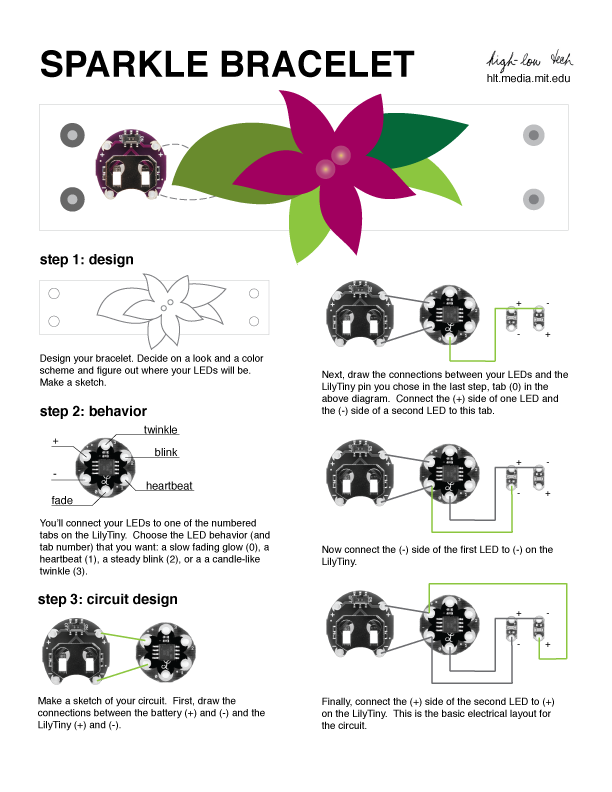
On the plus side, by making the mistakes, I learned a lot about how the conductive wire, LilyTiny, LEDs, and sewable battery holder work. As soon as I finished, I realized that I should have put all the wiring on the pink piece of felt, where they'd be hidden by the green piece of felt and would fit a little better.

I used this image to help me think about my plan:


And, here's my plan:
On to try #2!


Wednesday, January 7, 2015

Programming, Metaphor, and Light

Lately, I've been posting a lot about other people's classes, so today I'm going to take today to share what I've been doing in my classes.

The 7th graders are starting a project this week using soft circuitry to create a symbolic, programmed object. Here's how it works:

  • Prior to the project, we'd explored paper circuits, so they understand the concept of a circuit.
  • To start the project, I showed students 3 examples of soft circuitry from my blog.
  • Then I asked them, "Well, what might YOU make?" and shared this document with them:


(The students definitely asked me to un-nerdify the 3 bullet points & I said, "Design and make an object, plan how your circuitry and microcontrollers will work, and make sure your object is symbolic")
  • I asked the students to look at the following 4 images:
Olympic-logo.pngbatman-logo-big.gifFreeVector-Apple.jpgAthletics-Gator-350px.jpg

  • They identified each one immediately. In case you don't know the 4th one, that's the Shipley Gator.
  • I explained that these 4 logos are symbols for events, characters, companies, and schools. Even though they don't have words, viewers see them and can identify a whole bunch of meaning that goes with them.
  • The students then found their own logos and put them in a shared document.
  • Next, I said that symbols are often more abstract than a company logo, and shared these 4 images:

Oak-tree-in-field-007.jpgwhite_dove-t2.jpgIliveinEuropeand .jpg8421115817526p
  • Then, they pulled out ideas of what a tree, dove, gravestone, and light might symbolize, and we talked about how they might choose a corporate-ish symbol or a symbolic object - it was completely up to them.
  • Next, I gave the students all the resources, and had students store them in plastic bags:
  • The items they received were:
  • The items I had in reserve were:
  • Finally, we talked about the theory of design (Using all available resources to make things happen) and what they might need to know and do in order to bring their project to completion.
Monday was the first day . . . I can't wait to see what they come up with!

Tuesday, December 9, 2014

Soft Circuitry Monster with Glowing Eyes

The entire purpose of this post: I just plain love this monster with glowing eyes. Made by one of my students.


Friday, December 5, 2014

Roman Political Graffiti Gets Modernized

I seem to collaborate with Latin teachers a lot, which is funny because I don't know much about Latin. I mean, I know what my last name means, but that's about it.

I know more now, though. For example, I know that one should never Google "Roman Political Graffiti" because the results will be . . . bawdy. Very, very bawdy. Not that I made that mistake. Every Latin teacher who hears about this project IMMEDIATELY says, "DON'T Google Roman Political Graffiti." I think it's what they teach in Latin teacher educator classes on day 1.

The Project:
In honor of last month's elections, Mrs. Smith wanted her students to consider the relationship between current and past political rhetorics.

First, Mrs. Smith set up a Google Classroom for the class. Because the material would be too risqué for students to search for themselves, Mrs. Smith set up 3 Google Drawing templates that featured images of school-appropriate political graffiti and set it up as an assignment in Google Classroom.

In class, Mrs. Smith gave the students a mini-lesson about the role of graffiti in Roman Political life, from painting over someone else's words to challenging the status quo. She then connected that way of communicating publicly to digital ways of communicating publicly. She had them join the classroom (which took about 30 seconds . . . those 8th graders are getting very familiar with Google classroom) and start working.

Students considered ways to Latinize their names, what they stood for as candidates, and ways they could make the visual image evoke Roman stylings.
Because everything was saved in Google classroom, after students handed in their first draft, Mrs. Smith could comment on ways to improve vocabulary and grammar, ask students to resubmit, and accept their new submissions, all online without having to sift through papers.

And THEN . . . that project was such a success that Mrs. Smith replicated it with her 7th Graders (WITHOUT MY HELP!!!), this time focusing on the 7th graders' trip to Washington, DC and the Greek and Roman influences on the architecture of various memorials. Mrs. Smith again uploaded photos as a template; however, this time, some students used their own photos instead. Each image included a quote (often from the memorial's subject), a Latin saying, and a brief reflection on the experience. Beautiful. (And perfect for those digital portfolios that we're launching!)


Thursday, November 13, 2014

Thinglink & Voicethread . . . which to use?

The conundrum: a Spanish teacher wants her students to explore a piece of art and create a digital presentation. She'd like the presentation to include students speaking, links/videos to external sources, and the ability for students to work collaboratively.

Thinglink and Voicethread both allow for all of these, but they each have benefits and drawbacks.

Here's an example of a Voicethread (poor Dave Baroody is always my example):


The benefits I see: Voicethread's commenting process is simple, it's easy for groups to collaborate because Voicethread was built for conversations, students can draw on a picture as they speak to point viewers to details of paintings, and the groups could have more than one slide per presentation, so they could present more than one image. ALSO, because it's made for collaboration, there's also the possibility of sharing a Voicethread with a Spanish class from another school and connecting across schools.

The drawbacks: the comments are linked to a person rather than a part of the image, and so a person viewing the presentation doesn't know what the comments will be about until she's already pressed the comment. That makes the content of the presentation feel more about the conversation than it feels about the content.

The other option is Thinglink:
Benefits of Thinglink: It's pretty. Really pretty. And the comments are a part of the image, so it's very much a presentation tool, too. Students can collaborate by allowing each other to edit their image.

Drawbacks: Making a class as an educator seems like it would be frustrating. All links have to be external, so if a student wants to add a voice recording or a video, she has to know how to use Soundcloud or youtube respectively. The students can figure these things out quickly, but the number of steps means a larger likelihood of error, a larger digital footprint, and more class time devoted to negotiating the technical aspects of the program.

So, which would you use? I'm torn.